Turning Dead Letter Queue Chaos into Actionable Intelligence
Cloud Queue Commander analyzes dead letter queues, detects patterns, and safely resolves issues. With AI diagnostics and batch operations, it ensures reliable and efficient performance for applications built on microservice architectures.
Functional Application Managers needed a way to analyze, troubleshoot, and act on failed messages efficiently. 85% of dead letter queues are managed inefficiently — leading to costly downtime and application instability.
Three Problems That Had No Scalable Solution
Functional Application Managers were fighting dead letter queues with inadequate tools — no pattern recognition, no bulk actions, and no clear path from failure to resolution.
The Manual Reality
- Retrieving and analyzing large volumes of failed messages required manual inspection
- Identifying root causes was time-consuming and required cross-referencing multiple sources
- Taking corrective actions on message groups risked data loss or application instability
- No pattern recognition — every failure felt like a brand new problem
Three Core Jobs-to-be-Done
These three statements defined the entire product scope and design direction.
Mapping the Workflow Before Designing the Interface
The target users were Functional Application Managers — technical professionals responsible for monitoring and troubleshooting message queues. They needed tools that allowed them to detect failure patterns, resolve issues at scale, and ensure seamless application performance without manually sifting through messages.
Opportunities Identified- Enhanced Filtering & Search — advanced filters to quickly locate failed messages
- Pattern Recognition — AI-driven insights to identify common failure types
- Bulk Action Management — act on message groups efficiently and safely
- Detailed Message View — structured failure reports with full transparency
"When I am a Functional Application Manager, I want to efficiently address messages in the dead letter queue, so I can ensure reliable application performance without risking data loss."
AI-Assisted Ideation to Move Faster and Smarter
We combined user flows and wireframes to create a seamless connection between screen interactions and navigation. AI prompting was used to rapidly explore product naming, positioning, and initial wireframe concepts — accelerating ideation without replacing critical design judgment.
AI-Assisted Wireframing
Used AI prompts to explore design directions for the dashboard and queue management views. This accelerated early-stage exploration and helped the team align on concepts faster.
Jobs-to-be-Done Framework
Structured the entire product around three clear user jobs: Analyze, Diagnose, and Act. Every feature was evaluated against these jobs before being included in scope.
Prototype-Driven Validation
Built clickable prototypes covering the full workflow — from queue access through pattern analysis to corrective action — to validate direction with stakeholders early.
A Dashboard Built Around Pattern Recognition & Confident Action
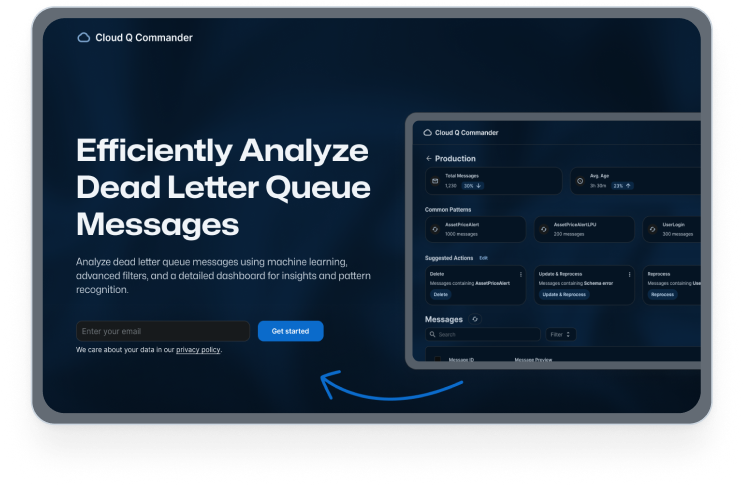
The Cloud Q Commander dashboard gives Functional Application Managers a clear, actionable overview of their production queues — with AI-suggested actions, pattern grouping, and bulk operations that make corrective work fast and safe.
Three key user types
The primary user needed to move fast and act safely. Supporting roles needed visibility and accountability. The interface had to serve all three without introducing complexity for the people who needed simplicity most.
Functional Application Manager
Monitors and troubleshoots message queues across microservice applications. Needs pattern recognition and bulk actions to resolve issues without risking data integrity.
DevOps Engineer
Manages queue infrastructure and needs high-level visibility into queue health, historical patterns, and processing performance to prevent recurring failures.
Technical Lead
Oversees application reliability. Needs audit trails to track corrective actions, validate outcomes, and maintain compliance with SLA requirements.
Measurable Improvements in Every Dimension
50% Reduction in Troubleshooting Time
AI-driven pattern recognition and suggested actions drastically cut the time spent manually investigating failed messages across production queues.
Improved Resolution Accuracy
Structured failure reports and pattern grouping improved the accuracy of diagnosing recurring failure types — reducing misidentification and incorrect fixes.
Higher Operational Efficiency
Bulk action management allowed users to handle large message volumes efficiently — shifting focus from reactive firefighting to proactive monitoring.
Key Takeaways
Designing for a technical audience forced precision at every level — from information architecture to the language of error states. Three lessons stayed with me.
AI as a Design Partner
Leveraging AI for wireframing and ideation accelerated exploration without replacing critical design thinking. It's a tool that expands the possibility space — not a replacement for judgment.
User Control Matters Most
Balancing automation with user control over decision-making was critical for building trust. Users needed to feel confident automated suggestions wouldn't cause unintended consequences.
Pattern Recognition is the Core Value
The most impactful feature was helping users see failure patterns they couldn't see before. Surfacing invisible structure in complex data is where design creates the most leverage.